Crafting the Perfect Subject Line
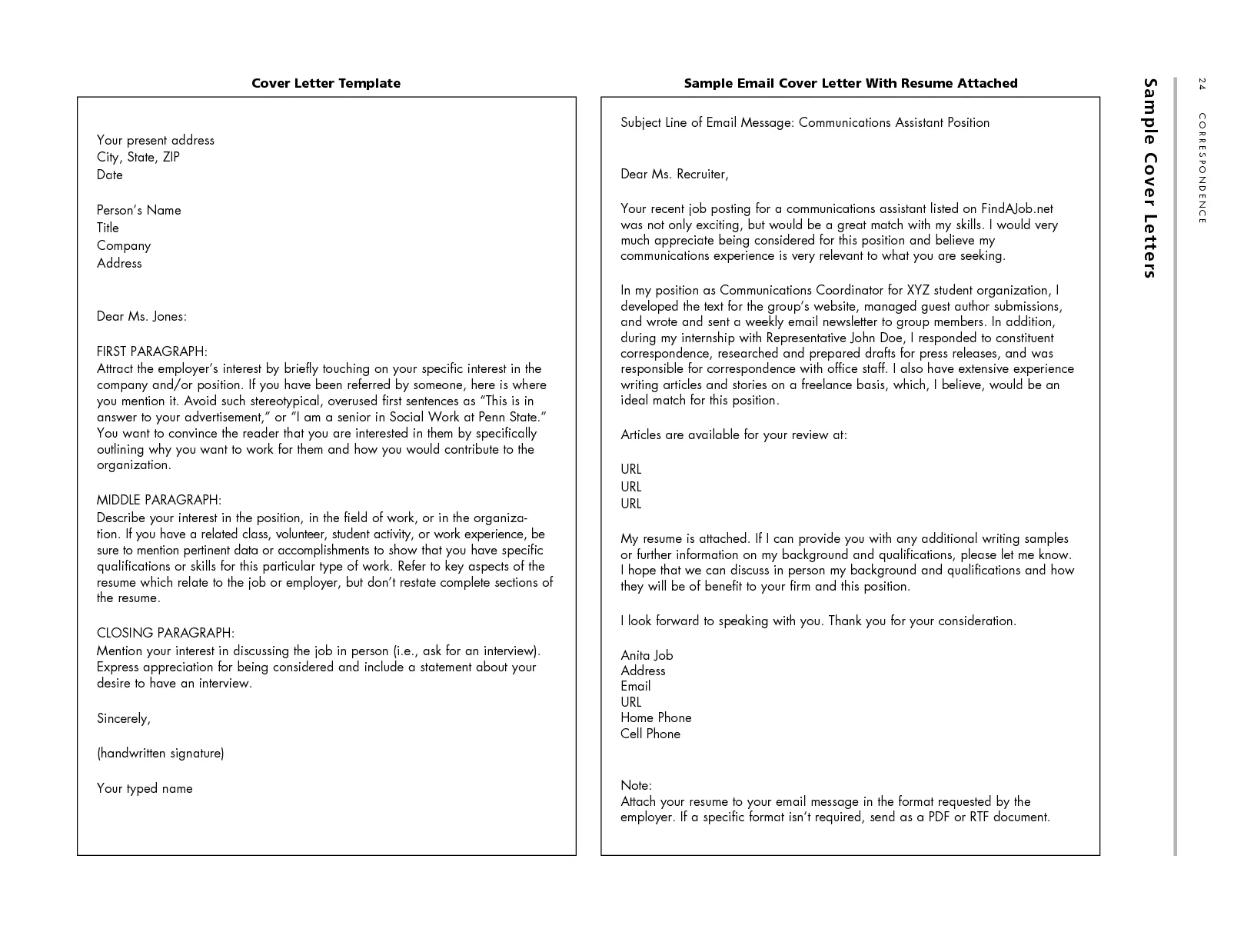
The subject line is the first thing a hiring manager sees, making it crucial for grabbing their attention. A well-crafted subject line ensures your email doesn’t get lost in a sea of applications. It’s your chance to make a strong first impression and encourage the recipient to open your email. A generic subject line like “Resume” or “Job Application” is often overlooked. Instead, be specific and include the job title, the company name, and possibly your name. For instance, “Software Engineer Application – [Your Name] – [Company Name]” is much more effective. This immediately tells the recruiter what the email is about and helps them organize applications. It also allows them to easily search for your application later. Remember to keep it concise, clear, and relevant to the job you’re applying for. The subject line sets the tone and indicates your attention to detail, signaling professionalism from the start, thus increasing the chances of your application getting reviewed.
Keywords and Specific Job Titles
When creating your subject line, incorporating keywords and the specific job title is essential. Many companies use Applicant Tracking Systems (ATS) to screen applications, and these systems often scan for keywords. By including the exact job title in your subject line, you increase the likelihood that your email will be correctly routed and viewed by the hiring manager. Furthermore, if the job description highlights specific skills or qualifications, try to weave those keywords into your subject line subtly. This shows that you have carefully read the job posting and understand the requirements. For example, if the job description emphasizes “project management” and “communication skills,” you could include phrases like “Application for Project Manager – [Your Name] – Expertise in Project Management.” This approach not only helps with ATS but also immediately demonstrates that you are a strong candidate, who pays attention to details and is able to customize their applications. Tailoring your subject line is a proactive step that can significantly boost your chances of getting noticed.
Professional Email Greeting

Starting your email with a professional greeting sets a positive tone and shows respect for the recipient. Avoid casual greetings like “Hey” or “Hi there.” Instead, use “Dear [Mr./Ms./Mx. Last Name]” or “Dear Hiring Manager,” if you don’t know the recipient’s name. If you have a contact name, make sure to address them correctly, including their title. Always double-check the spelling of the name. Errors in the greeting can make you appear careless. Using a formal greeting demonstrates professionalism and courtesy. It creates a positive first impression, setting the stage for the rest of your email. This attention to detail highlights your professionalism and respect for the recipient’s time and effort. Even though you might be applying for a job in a casual work environment, maintaining a professional tone in your initial communication is always advisable. Remember, first impressions matter. The way you greet the hiring manager is the first indication of your communication skills.
Tailoring Your Message to the Recipient
Personalizing your email to the recipient is a key step in making a strong impression. Avoid using generic, mass-produced templates, as they can come across as impersonal and show a lack of genuine interest. Instead, take the time to tailor your message to the specific job and the company. Research the company and mention something you admire about their work or culture. Reference specific aspects of the job description and explain how your skills and experiences align with their needs. If possible, address the email to a specific person. If the job posting names a contact person, reference them directly. This shows that you’ve done your homework and are genuinely interested in the opportunity. Briefly explain why you’re a great fit for the role, highlighting the most relevant skills and achievements. Tailoring your message shows the hiring manager that you are serious about the role and that you have put in the effort to understand the company’s needs, setting you apart from candidates who send generic applications. This is a crucial step in showcasing your interest and your ability to bring value to the company.
Highlighting Key Accomplishments
In the body of your email, it’s essential to showcase your key accomplishments. Instead of simply listing your job responsibilities, focus on the results you achieved in previous roles. Use quantifiable data whenever possible. For example, instead of saying, “Managed social media accounts,” say, “Increased social media engagement by 30% in six months.” This type of detail provides tangible proof of your skills and value. Choose one or two accomplishments that are most relevant to the job you’re applying for, and briefly describe the situation, your actions, and the positive outcome. This is a way to provide the context to demonstrate the value you brought to your previous employers. Keep your paragraphs concise and easy to read, making sure the hiring manager can quickly grasp your key contributions. Highlighting your accomplishments is more effective than listing your duties. It provides specific examples of your capabilities and helps the hiring manager see how you can contribute to their organization. Showcasing your achievements is a very effective method for your job search.
Summarizing Your Value Proposition

After highlighting your accomplishments, it’s important to summarize your value proposition briefly. In one or two sentences, reiterate your key skills, and how you can contribute to the company. This is your chance to make a concise case for why you’re the right candidate. Focus on the core qualifications that make you uniquely suited for the job. Summarize how your experience aligns with the job requirements and what you bring to the table. For instance, “I am confident that my experience in project management, combined with my strong communication skills, will allow me to immediately contribute to your team’s success.” This summary reaffirms your understanding of the role and underscores your capabilities. Make sure that your value proposition is aligned with the job description. The main objective is to underscore the most important skills that align with the job requirements, leaving the hiring manager with a clear understanding of the value you bring. Make the message to be as compelling and clear as possible.
Attaching Your Resume and Cover Letter
Ensure you attach your resume and cover letter to your email. Many job seekers overlook this simple step, which can lead to a delayed or missed application. It is essential to format your documents correctly, as well as to be certain that the attachments are present before sending the email. Always attach your resume and cover letter as PDF files. This ensures that your documents are displayed correctly, regardless of the recipient’s software or device. Also, you can clearly see that your attachments are ready. Double-check that you have the correct versions of these documents attached. Sometimes, individuals accidentally send an older version. The file names should be clear and professional, such as “[Your Name] - Resume.pdf” and “[Your Name] - Cover Letter.pdf.” This makes it easy for the recipient to identify your files. A missing attachment can be a significant mistake. Verifying that you have attached the appropriate documentation is essential.
File Format Best Practices
When attaching your resume and cover letter, it’s crucial to adhere to best practices. Always save your documents as PDFs. The PDF format preserves the formatting of your documents, making it appear the same on any computer or device. Avoid using formats such as .doc or .docx. which might lead to compatibility issues. Use clear, professional file names. This will make it easy for the hiring manager to find your application. For example, use “[Your Name] - Resume.pdf” and “[Your Name] - Cover Letter.pdf.” before you send the email, open the attached documents to make sure they are the correct versions and that they look exactly as you intend. It is worth checking the documents’ formatting and layout. Following these file format best practices ensures a professional appearance and simplifies the process for the hiring manager. Using the correct format and file names demonstrates your attention to detail and professionalism.
Email Signature Essentials

A professional email signature is an important element of your email correspondence. A well-crafted signature provides all the necessary contact information in a clear and concise manner. It also adds a layer of professionalism to your communication. Make sure your signature includes your full name, professional title (if applicable), phone number, email address, and a link to your LinkedIn profile. Your email signature should be easily accessible. Avoid including unnecessary information such as quotes or images. Your signature should maintain a consistent look. The inclusion of a link to your LinkedIn profile is particularly beneficial, as it enables hiring managers to learn more about your professional background and skills. Regularly review and update your email signature to ensure all information is current. Consider it a digital business card, providing all the essential contact details in a streamlined way. Make sure your email signature is professionally designed and includes relevant contact information.
Contact Information and Social Links
Include your contact information in your email signature. This should include your phone number and email address, making it easy for the hiring manager to reach you. Ensure that your phone number is up-to-date and that you have a professional voicemail greeting. Add a link to your LinkedIn profile in your signature. LinkedIn is a professional platform where you can showcase your skills, experience, and network. It provides more context for the hiring manager. Also, avoid including links to other social media accounts unless they are relevant to your profession or the job you are applying for. Make sure that your LinkedIn profile is up-to-date. When including links, ensure they are working. Make sure your contact information is clearly formatted and easy to read.
Proofreading and Error Checking
Before you send your email, carefully proofread and error-check your entire message, including the subject line, the body, and the attachments. Typos, grammatical errors, and formatting inconsistencies can negatively impact your impression, indicating a lack of attention to detail. Use a grammar checker or proofreading tool to catch any mistakes you might have missed. Read your email aloud. This can help you spot awkward phrasing and other errors. Ask a friend or a colleague to review your email. A fresh pair of eyes can often catch mistakes you might have overlooked. Make sure your email is well-organized, with clear and concise sentences. Ensure that your attachment file names and formats are correct. Proofreading and error checking is a crucial step, as it ensures that your message is professional and polished. Reviewing your email before sending is essential.
Avoiding Common Mistakes

Several common mistakes can ruin your chances of getting noticed. Avoid using unprofessional email addresses, such as nicknames or inappropriate phrases. Also, avoid lengthy emails. Keep your message concise and focus on the most important information. Don’t include irrelevant information or excessive details that might distract the hiring manager. Ensure that your email is easy to read, with proper formatting and spacing. Avoid using slang or abbreviations. Ensure that the attachments are correct and up to date. A lack of attention to detail shows a lack of professionalism. Make sure to read the job description carefully and tailor your application to the specific requirements. Remember, the goal is to present yourself as a professional candidate and avoid any errors that might make a bad impression. The key is to stay focused on presenting yourself as the ideal candidate for the role.
Formatting Your Email Body
The formatting of your email body is just as important as its content. Use clear and concise language, and break up large blocks of text into shorter paragraphs to make the email easy to read. Use bullet points or numbered lists to highlight key skills, accomplishments, or responsibilities. This makes it easier for the hiring manager to scan and quickly grasp the essential information. Ensure your email is easy to read on mobile devices. Many hiring managers will review emails on their smartphones or tablets, so use a simple, clean font and a readable font size. Use bolding to emphasize important points. Maintain a consistent font style and size throughout the email. Poor formatting can distract the reader and make it difficult to focus on your message. Proper formatting helps to organize your information. A well-formatted email demonstrates your professionalism and attention to detail.
Concise and Direct Language
Use concise and direct language to keep your email focused and professional. Avoid using jargon, overly complex sentence structures, or unnecessary words that might confuse the hiring manager. Get straight to the point and focus on the essential information. Use active voice, which is more direct and engaging than passive voice. For example, instead of saying “The project was managed by me,” say “I managed the project.” Use clear and straightforward language. This will help to get your message across quickly and efficiently. Keep the tone of your email professional and respectful. Avoid using slang, casual language, or overly familiar phrases. Conciseness enhances the clarity of your message and helps the hiring manager quickly grasp your key points, maximizing your chances of making a strong impression. A clear message will improve your credibility. The less wordy your message, the better.
Emailing Best Practices

Before sending, always send a test email to yourself to see how the email will appear to the recipient. Check the formatting, attachments, and links to make sure they are working correctly. When responding to a job posting, follow the instructions provided. Some employers will ask you to send the email to a specific address or include specific information in the subject line. When replying to an email, ensure you include the original message in your response to provide context. Avoid using all caps. It comes off as shouting. Always reply to the sender promptly. Respond within 24 hours. These best practices will enhance the effectiveness of your application and increase your chances of being considered for the role. Pay attention to details.
Mobile Device Compatibility
With the increasing use of mobile devices, it is essential to ensure that your email is mobile-friendly. Many hiring managers review emails on their smartphones or tablets. Make sure your email is easy to read on smaller screens. Use a simple and clean design. Keep your subject line concise so the hiring manager can read it at a glance. Avoid using wide tables or complex formatting that might not display correctly on mobile devices. Keep your paragraphs short and easy to read on a smaller screen. Use a readable font size. Test your email by sending it to yourself and checking it on a mobile device. Mobile-friendly design is crucial for ensuring that your message is accessible and easy to read. This will increase your chances of making a positive impression on the hiring manager, as they may be reviewing your application on a mobile device. A simple, clean design will make your application easier to read.
Following Up Effectively
After submitting your resume and cover letter via email, it’s important to follow up. A well-timed follow-up can show your continued interest in the position and your dedication. However, avoid following up too soon after sending your application. Give the hiring manager or recruiter adequate time to review your application before sending a follow-up email. In the follow-up email, briefly reiterate your interest in the position, and express your excitement. Reference something specific that you discussed in your original application or the job description, and ask if the hiring manager has had a chance to review your application. Be polite, and keep the tone professional. A polite follow-up shows that you are eager for the role.
Timing Your Follow-Up

The timing of your follow-up is crucial for maximizing your impact. Generally, it is best to follow up about one week to ten days after you submit your application. If the job posting specifies a timeline, adhere to it. If there’s a specified deadline, wait until that date has passed before sending your follow-up. If you haven’t heard back after a couple of weeks, it is acceptable to send another follow-up. Avoid sending multiple follow-up emails. This can come across as too aggressive. If you don’t receive a response after a second follow-up, consider it a sign that they are not interested in pursuing your application. The purpose of your follow up is to demonstrate your interest. By timing your follow-up appropriately, you can increase your chances of getting noticed. Timing your follow-up shows your professionalism.
Responding to Replies Promptly
If you receive a response from a hiring manager or recruiter, respond promptly. A delayed response might give the impression that you are not interested or that you are disorganized. Read the email carefully, and address any questions or requests in your reply. Be professional, and express your gratitude for the response. Show your willingness to provide additional information or participate in an interview. If you need more time to respond, let them know when you will reply. Showing your respect is crucial when responding. Responding to replies promptly indicates your interest and professionalism and increases your chances of moving forward in the hiring process. Make your replies quick, and answer all questions.